Home

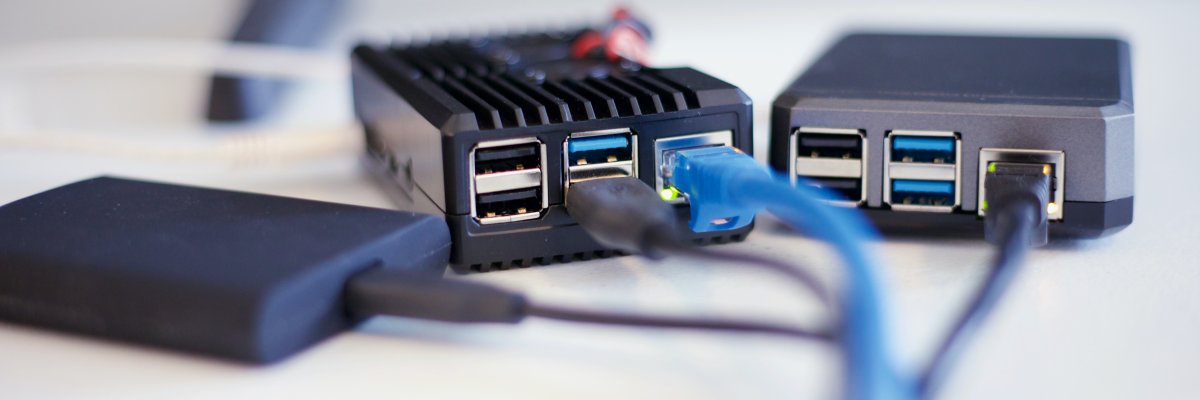
I've had a pihole on my home network for years. I set it up on a pi3b natively and it ticked along doing its thing, until it didn't. The sd card wore out and became read-only. It took me a while to discover that that was the issue, as it still worked, but you couldn't make any changes. Well, you could - everything seemed to work, but nothing was actually being written. Fortunately I had a teleporter backup of the pihole. I quickly spun up a vm with a pihole docker instance and loaded the data from backup. I then pointed all the machines at the new IP 1. In the mean time, I ordered m2 sata SSDs and USB enclosures, and worked out how to get my two raspberry pi's to boot off a USB attached SSD.2
When I re-setup the pi on the new SSD, I decided that the convenience and ease of the docker setup was ideal. I ran both instances of pihole but kept them separate initially. I eventually found a script to sync the piholes via git. At a later date, I found gravity-sync, which is just brilliant.
I configured all my hosts to use the pi as primary dns, and the pihole vm as secondary. This worked brilliantly until a few months later, I noticed a weird issue where internet access seemed a bit slow. It took a short while to open up an initial connection to a site, but after that things were fine. Investigating, I discovered the pi wasn't responding to ping. The SSD had died. I RMA'd the SSD and ordered a replacement. They're fairly cheap and the RMA process will take a while. In the mean time, I configured everything in the network to point to the pihole vm as primary.
While waiting for the new SSD to arrive, I was thinking about load balancing. Previously, the pi was answering queries from most of the user devices, while the vm was answering queries mostly for my internal servers/services. NGINX could do the load balancing and I was already using a few instances for various things, and I am also using Nginx Proxy Manager to handle just about everything. I figured I could probably use it to do the balancing as well.
You can't use Nginx Proxy Manager to do load balancing. Yet3. Their interface doesn't allow for it.4
I set up a new nginx docker instance using the official alpine slim container, as I'm only going to use it for load balancing, I don't need bells and whistles. The image is ~11mb.
I created a file called stream.conf and included it in nginx.conf.
stream.conf:
stream {
        upstream dns_servers {
                random;
                server 192.168.0.2:53;
                server 192.168.0.3:53;
        }
        server {
                listen 53;
                proxy_pass dns_servers;
        }
        server {
                listen 53 udp;
                proxy_pass dns_servers;
        }
}
I also made sure to pass port 53 tcp & udp to docker.
I've now configured the load balancer as primary DNS, with one of the pihole instances as secondary 5 So far it's working really well. I did notice some delays here and there, but I solved that, see footnote 4.
One drawback of this method is that the piholes only see queries coming from the load balancer, they don't see the actual source of the query. This is not a huge issue for me. I've also configured my firewall to capture direct external DNS query attempts and redirect them to the load balancer with some source and destination NAT thrown in.
Photo by Christophe Hautier on Unsplash
-
A quick summary of the setup: pihole container with a cloudflared container to tunnel DNS over HTTPS, both containers with their own local network IPs via macvlan docker network. The only drawback is that the docker host can't communicate with the two containers. There are workarounds for that, but I didn't bother. ↩
-
For the pi3b, it was a matter of writing a utility image to an sd card and booting off it. For the pi4b, nothing additional needed to be done. ↩
-
This issue has been ongoing since 2019, and still no sign of v3 although there are recent commits to the branch, so it's not abandoned. ↩
-
I just discovered you CAN get it working if you put the necessary config directives in to a conf file in the stream config directory. HOWEVER, there may not be enough worker_connections configured, in fact the directive doesn't seem to be used in any of the container's nginx config files which means it will default to either 512 or 1024 which is definitely not enough for a load balancer for DNS. I noticed my load balancer logs complaining about insufficient workers while I was testing this, so I had to increase it. ↩ ↩
-
And I've set the other pihole as tertiary for those systems that support 3 DNS server entries. I should also note that on the pihole docker hosts themselves, I've set the other pihole as primary DNS with an external DNS server as secondary. This gets around the problem of the pihole docker host not being able to communicate with its own macvlan networked containers. ↩

My current hobby is 3D printing. I've spent quite a bit of time and money upgrading my printer and getting it working well. My latest foray was to convert it to use Klipper via running Mainsail on one of my raspberry pi computers. I discovered that the Moonraker API can control smart plugs, so you can do things like remotely power on your printer and other devices. I bought two cheap wifi smart plugs from Amazon that turned out to be Tuya/Smart Life based - which Moonraker doesn't support. Boo.
Moonraker does provide a generic http plugin interface for controlling smart devices, so Moonraker Tuya Generic HTTP Server was born!
Photo by Markus Spiske on Unsplash
View all of Moonraker Tuya Generic HTTP Server
Ultimately this is related to setting up MainsailOS for use with my modified 3D printer (Creality CR6-SE).1
I had a Pi4B 8Gb running Home Assistant OS on an m1 sata SSD in a USB enclosure, which I had no issues with whatsoever, however all my intentions for Home Assistant haven't materialized, so I figured I'd get more use out of it if I switched to running Klipper on it. Ultimately I decided on using Mainsail via their MainSailOS raspberry pi image.
Considering that the Home Assistant OS installation on the SSD was easy enough via Raspberry Pi Imager when I decided to convert from using an SD Card to using an SSD, and since Mainsail OS is available via RPI Imager, I figured it would be easy to just write the image to the SSD and off I go.
It was not to be. 2
After allowing some time for the system to boot and resize the partition, I was still unable to ping the device's IP (set via static DHCP). I connected a screen and keyboard to the pi and restarted it (as it was headless it had not initialized the display). The system started booting, then complained about disk corruption. It also threw a kernel panic. Some boots it would attempt to do the partition resizing but then complain of missing partitions. But it usually ended up with a kernel panic.
I connected the SSD to my desktop, cleared the partitions, created a windows partition then ran a surface scan on it to rule out any issues with the device. It passed with zero issues. I cleared the partitions again and re-wrote the image. The pi booted and had the same issue. I tried the 32bit version of the image with the same result. I then tried the raspberry pi OS lite image. Same issues again.
I wrote the Mainsail OS image to an SD Card, and successfully booted off that. I thought that if it was having an issue booting off the SSD for whatever reason, I could allow the SD Card to boot, the manually copy the data across to the SSD and then try booting it again. After successfully booting off the SD Card, I shutdown the system, put the SD Card in to a USB reader, and connected it and the SSD to another linux box. I successfully copied the data to the SSD, adjusted the UUIDs and tried to boot the pi with the SSD. I got a lot further this time, but still had issues.
I tried re-copying the SD Card to the SSD using rpi-clone however it failed very soon in to the operation saying that the device had disappeared. Syslog message indicated tha the XHCI USB device had disconnected.
After some googling, I determined that the current pi kernel has an issue with certain USB devices and the uas (USB Attached SCSI Mass Storage) driver. It seems it hates the JMicron controller that the USB enclosure uses.
The fix was to add a line to /boot/cmdline.txt. I just had to get the vendorID and productID of the device, which is available via the dmesg command.
This article was very helpful.
I added usb-storage.quirks=152d:0578:u to the beginning of /boot/cmdline.txt 3, separating it from the subsequent commands with a space. I rebooted the pi with the new setting.
I cleared the partitions on the SSD and used rpi-clone again, and this time it completed successfully.
I shut down the pi, removed the SD Card, and booted with just the SSD connected. SUCCESS! The pi booted quickly this time, with no further errors.
Troubleshooting this issue took much longer than it should have, but that's just the way of it.
I now have a working Mainsail installation. Now to configure it to work with my slightly customised Creality CR6-SE.
Photo by Jainath Ponnala on Unsplash
-
I've left out some of the additional troubleshooting and testing that I did. ↩
-
I don't know why seemingly simple things that should take 5 minutes always end up sucking the life out of you. For example, I needed to replace one of my 8tb disks in my NAS as it was constantly having errors. So I took the system down to replace the drive, and of course I removed the wrong drive cage initially - I have now marked the drives for future reference - but eventually found the drive, and swapped it out. I put everything back and powered up the system only to discover the entire pool is gone. Having replaced drives in the pools before, this is not normal. I realized that the system wasn't seeing two of the 5 drives in the pool, so I had obviously managed to disconnect them, and sure enough when I powered down the machine to check, I had accidentally unplugged two of the drives. >.< I then connected everything properly and powered on the system and the pool was still missing. I reimported the pool, ran the drive swap command and all was good. What should have taken 5 minutes took me about 30. I digress. ↩
-
Edit 29/04/2024, file has now moved to
/boot/firmware/cmdline.txt↩
If you have a Tello drone - actually this is probably the case for any device that you need to connect to via wifi in order to configure/control from iOS / iPadOS - if you have issues with the app just not detecting the drone even if you're connected to the device's wifi connection, try the following:
1) In the Settings app, scroll down to the particular app settings and check that it has local lan access.
2) Forget your home wifi network so that iOS/iPadOS stops trying to connect to it when it doesn't detect internet access on the drone wifi.
3) Disable Mobile Data. Even if you're connected to the drone wifi and getting an IP address - if Mobile Data is connected, the software will not be able to connect to the drone.
Now it should work. Good luck.
View all of Tello Drone & iOS Wifi Connection Issues
that the most precious commodity in the apocalypse would be toilet paper?
View all of Who would've thought...